AI Utils
Installation and configuration
Make sure to install the required libraries for the chosen method. For SpaCy, Sentence Transformers or OpenAI LLM, you can install them with the following command:
pip install toolium[ai]
Additional Requirements:
For SpaCy, you also need to download the language model, i.e. for small English model:
python -m spacy download en_core_web_sm
For OpenAI LLM, you need to set up your configuration using environment variables or include it in the Toolium configuration. The required parameters will vary depending on your access type (direct OpenAI or Azure OpenAI):
# For example, to configure direct OpenAI access:
OPENAI_API_KEY=<your_api_key>
# For example, to configure Azure OpenAI:
AZURE_OPENAI_API_KEY=<your_api_key>
AZURE_OPENAI_ENDPOINT=<your_endpoint>
OPENAI_API_VERSION=<your_api_version>
[AI] section:
[AI]
# If you are using Azure OpenAI azure_api_key: your-azure-api-key azure_endpoint: https://your-endpoint.azure.com api_version: 2025-01-01-preview azure_deployment: gpt-4o-mini azure_temperature: 0.7 # Optional Temperature for OpenAI model, between 0 and 1. # If you are using OpenAI directly openai_api_key: your-openai-api-key openai_temperature: 0.7 # Optional Temperature for OpenAI model, between 0 and 1.
Different AI providers can be used in the same project.
Text Similarity
Text similarity is a measure of how alike two pieces of text are in terms of meaning, structure, or content. Toolium provides several methods to compare and validate text similarity using different AI techniques:
1. SpaCy: Uses the SpaCy library to compute text similarity with pre-trained NLP models. Fast, lightweight and good for general-purpose text analysis.
2. Sentence Transformers: Leverages Sentence Transformers for semantic textual similarity using deep learning embeddings. Best balance of accuracy and performance for semantic similarity.
3. OpenAI: Utilizes OpenAI’s language models for advanced semantic text comparison. Provides the most sophisticated analysis but requires API access and it may incur costs.
Usage
You can use the function assert_text_similarity from toolium.utils.ai_utils.text_similarity module to compare two texts using any of these methods. You can specify the method to use with the similarity_method parameter and set a threshold for similarity with the threshold parameter (a value between 0 and 1, where 1 means identical and 0 means completely different).
from toolium.utils.ai_utils.text_similarity import assert_text_similarity

# Basic usage
input_text = "The quick brown fox jumps over the lazy dog"
expected_text = "A fast brown fox leaps over a sleepy dog"  # Admits both a single expected text or a list of expected texts
threshold = 0.8  # Similarity threshold between 0 and 1
similarity_method = 'spacy'  # Options: 'spacy', 'sentence_transformers', 'openai', 'azure_openai'

# Validate similarity
assert_text_similarity(input_text, expected_text, threshold=threshold, similarity_method=similarity_method)
Configuration
Default similarity method can be set in the properties.cfg file with the property text_similarity_method in [AI] section:
[AI]
text_similarity_method: openai  # Options: 'spacy' (default), 'sentence_transformers', 'openai', 'azure_openai'
spacy_model: en_core_web_lg  # SpaCy model to use, en_core_web_sm by default
sentence_transformers_model: all-MiniLM-L6-v2  # Sentence Transformers model to use, all-mpnet-base-v2 by default
openai_model: gpt-3.5-turbo  # OpenAI model to use, gpt-4o-mini by default
To select models for each method, you can refer to the following links:
Text Criteria Analysis
Text criteria analysis evaluates how well an input text matches a set of target characteristics (e.g., tone, style, clarity, domain vocabulary, specific described content, etc) using an LLM. Toolium provides utilities to both retrieve a structured analysis and assert quality thresholds.
Usage
You can use functions from the toolium.utils.ai_utils.text_analysis module:
get_text_criteria_analysis(): returns a JSON string with an overall score and low-scored criteria.
assert_text_criteria(): validates that the overall score is above a threshold and raises AssertionError otherwise.
from toolium.utils.ai_utils.text_analysis import get_text_criteria_analysis, assert_text_criteria
import json

input_text = "Hey team! Quick heads-up: deployment is done, all checks green."
text_criteria = [
    "professional tone",
    "clear and concise message",
    "it includes the status of the deployment"
]

# Get analysis (JSON string)
raw_analysis = get_text_criteria_analysis(
    text_input=input_text,
    text_criteria=text_criteria,
    model_name="gpt-4o-mini",  # optional
    azure=False                 # True for Azure OpenAI
)

analysis = json.loads(raw_analysis)
print(analysis["overall_match"])
print(analysis["features"])  # Only low-scored features (<= 0.2)
from toolium.utils.ai_utils.text_analysis import assert_text_criteria

# Assert text quality against a minimum score
assert_text_criteria(
    text_input="This message should be short, formal and informative.",
    text_criteria=["formal tone", "brevity", "informative content"],
    threshold=0.75,
    model_name="gpt-4o-mini",  # optional
    azure=False                 # set True for Azure OpenAI
)
Configuration
Default text analysis method can be set in the properties.cfg file with the property text_analysis_method in [AI] section:
[AI]
text_analysis_method: openai  # Options: 'openai', 'azure_openai' (default: azure_openai)
Response Format
get_text_criteria_analysis() expects the LLM to return a JSON object with:
{
  "overall_match": 0.82,
  "features": [
    {
      "name": "formal tone",
      "score": 0.15
    }
  ]
}
Where:
overall_match: float in [0.0, 1.0]
features: list containing only low-scored criteria (score <= 0.2)
Assertion Behavior
assert_text_criteria():
parses the JSON response returned by get_text_criteria_analysis()
compares overall_match with the provided threshold
raises AssertionError if overall_match < threshold
logs low-scored features to help diagnose why validation failed
Text Readability
Text readability is a measure of how user-friendly and comprehensible a piece of text is. Toolium currently provides a single method to assess text readability, using the SpaCy library.
Usage
You can use the function assert_text_readability from toolium.utils.ai_utils.text_readability module to assess the readability of a text. You can set the readability_method (currently only spacy), the threshold (a value between 0 and 1, where 1 means the text is very readable and 0 means it is not readable at all) and optionally the technical_characters, a list of characters to be considered as non-linguistic content, if you need to overide the ones set by default.
from toolium.utils.ai_utils.text_readability import assert_text_readability
# Basic usage
input_text = "This is a readable text with proper structure and vocabulary."
threshold = 0.8  # Readability threshold between 0 and 1
technical_characters = ['$', '%', '&']  # Optional: list of characters considered non-linguistic content
readability_method = 'spacy'  # Only 'spacy' is currently supported

# Validate readability
assert_text_readability(input_text, threshold=threshold, technical_characters=technical_characters, readability_method=readability_method)
Configuration
Default readability method and spacy model can be set in the [AI] section of the properties.cfg file:
[AI]
text_readability_method: spacy  # Only 'spacy' is currently supported
spacy_model: en_core_web_md  # SpaCy model to use, en_core_web_md by default
For more information on SpaCy models, you can refer to the following link:
Answer Evaluation using LLM-as-a-Judge
Answer evaluation using LLM-as-a-Judge is a technique to assess the quality and correctness of an LLM-generated answer by comparing it against a reference answer using another LLM. This approach provides context-aware evaluation considering semantic similarity, factual accuracy, completeness, and relevance.
Toolium provides methods to evaluate answers using OpenAI and Azure OpenAI models with optional structured output using Pydantic models.
Usage
You can use the functions from the toolium.utils.ai_utils.evaluate_answer module to evaluate LLM answers:
Basic evaluation without structured response:
from toolium.utils.ai_utils.evaluate_answer import get_answer_evaluation_with_azure_openai

llm_answer = "Paris is the capital of France and has a population of over 2 million people."
reference_answer = "The capital of France is Paris."
question = "What is the capital of France?"

similarity, response = get_answer_evaluation_with_azure_openai(
    llm_answer=llm_answer,
    reference_answer=reference_answer,
    question=question,
    model_name='gpt-4o'
)

print(f"Similarity score: {similarity}")
print(f"Explanation: {response['explanation']}")
Evaluation with structured Pydantic response:
from pydantic import BaseModel, Field
from toolium.utils.ai_utils.evaluate_answer import get_answer_evaluation_with_azure_openai

class SimilarityEvaluation(BaseModel):
    """Model for text similarity evaluation response"""
    similarity: float = Field(description='Similarity score between 0.0 and 1.0', ge=0.0, le=1.0)
    explanation: str = Field(description='Brief justification for the similarity score')

llm_answer = "Paris is the capital of France and has a population of over 2 million people."
reference_answer = "The capital of France is Paris."
question = "What is the capital of France?"

similarity, response = get_answer_evaluation_with_azure_openai(
    llm_answer=llm_answer,
    reference_answer=reference_answer,
    question=question,
    model_name='gpt-4o',
    response_format=SimilarityEvaluation
)

print(f"Similarity score: {similarity}")
print(f"Explanation: {response.explanation}")
Advanced evaluation with custom evaluation criteria:
from pydantic import BaseModel, Field
from toolium.utils.ai_utils.evaluate_answer import get_answer_evaluation_with_azure_openai

class AnswerEvaluation(BaseModel):
    """Comprehensive evaluation model"""
    similarity: float = Field(description='Similarity score between 0.0 and 1.0', ge=0.0, le=1.0)
    explanation: str = Field(description='Detailed evaluation feedback')
    accuracy: float = Field(description='Factual correctness score 1-5')
    completeness: float = Field(description='Information completeness score 1-5')
    relevance: float = Field(description='Relevance to question score 1-5')

similarity, response = get_answer_evaluation_with_azure_openai(
    llm_answer=llm_answer,
    reference_answer=reference_answer,
    question=question,
    model_name='gpt-4o',
    response_format=AnswerEvaluation
)

print(f"Similarity: {similarity}")
print(f"Accuracy: {response.accuracy}/5")
print(f"Completeness: {response.completeness}/5")
print(f"Relevance: {response.relevance}/5")
Assertion with threshold validation:
from toolium.utils.ai_utils.evaluate_answer import assert_answer_evaluation

# Validate that LLM answer meets minimum similarity threshold
assert_answer_evaluation(
    llm_answer="Paris is both the capital and the most populous city in France.",
    reference_answers="The capital and largest city of France is Paris.",
    question="What is the capital of France and its largest city?",
    threshold=0.7,  # Minimum similarity score (0.0 to 1.0)
    provider='azure',
    model_name='gpt-4o'
)
Evaluation Methods
The module provides the following evaluation methods:
assert_answer_evaluation(): Evaluates answer and asserts if similarity meets threshold
get_answer_evaluation_with_openai(): Uses OpenAI’s API directly for evaluation
get_answer_evaluation_with_azure_openai(): Uses Azure OpenAI’s API for evaluation
Evaluation Criteria
When evaluating answers, the LLM considers the following criteria:
Semantic similarity: Does the LLM answer convey the same meaning as the reference answer, even if phrased differently?
Factual accuracy: How factually correct is it compared to the reference answer?
Completeness: How thoroughly does it address all aspects of the question, covering all information from the reference answer?
Relevance: How well does it directly answer the specific question asked?
Scoring Guide
1.0: Perfect semantic match - answer is equivalent to reference answer
0.7-0.9: Similar meaning - minor differences that don’t affect overall correctness
0.4-0.6: Incomplete or partially similar - major differences or missing information
0.0-0.3: Different, irrelevant or contradictory - does not match the reference answer
Configuration
Default OpenAI model can be set in the properties.cfg file in the [AI] section:
[AI]
provider: azure  # AI provider to use, openai by default
AI agents for testing
Toolium provides utilities to create and execute AI agents in your tests using langgraph library, allowing you to simulate complex user interactions or validate AI-generated responses.
You can create an AI agent using the create_react_agent function from the toolium.utils.ai_utils.ai_agent module. This function allows you to create a ReAct agent, which is a type of AI agent that can reason and act based on the conversation history and tool interactions. You must specify the system message with AI testing agent instructions and the tool method, that the agent can use to send requests to the system under test and receive responses.
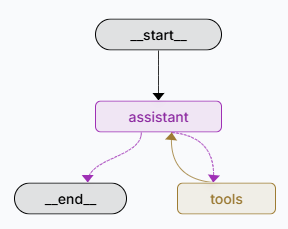
Once you have created an AI agent, you can execute it using the execute_agent function from the same module. This function will run the agent and log all conversation messages and tool calls, providing insights into the agent’s behavior and the interactions it had during execution. You can also provide previous messages to the agent to give it context for its reasoning and actions.
from toolium.utils.ai_utils.ai_agent import create_react_agent, execute_agent

# Create a ReAct agent with a system message and a tool method
system_message = "You are an assistant that helps users find TV content based on their preferences."
tool_method = tv_recommendations  # This should be a function that the agent can call as a tool
provider = 'azure'  # Specify the AI provider to use, e.g., 'azure' or 'openai'
model_name = 'gpt-4o-mini'  # Specify the model to use for the agent

agent = create_react_agent(system_message, tool_method=tool_method, provider=provider, model_name=model_name)

# Execute the agent and log all interactions
final_state = execute_agent(agent)
Default provider and model can be set in the properties.cfg file in [AI] section:
[AI]
provider: azure  # AI provider to use, openai by default
openai_model: gpt-3.5-turbo  # OpenAI model to use, gpt-4o-mini by default